How to use lightning/logger module in LWC
What is Lightning logger module
The lightning/logger module provides a function to add observability and track to your Lightning web components using the Custom Component Instrumentation API. Use the log() function to log custom messages to Event Monitoring from your components.
The lightning/logger module is only available in LightningExperience and this is not available in salesforce mobile app. To use lightning/logger module event moniter is must be enabled in your org. This module has only one log() method.
Lightning Logger event type:
The lightning logger event contains information from the Lightning Web Components logs. This event type is available in the EventLogFile object in API version 58.0 and later.
How to enable lightning logger event:
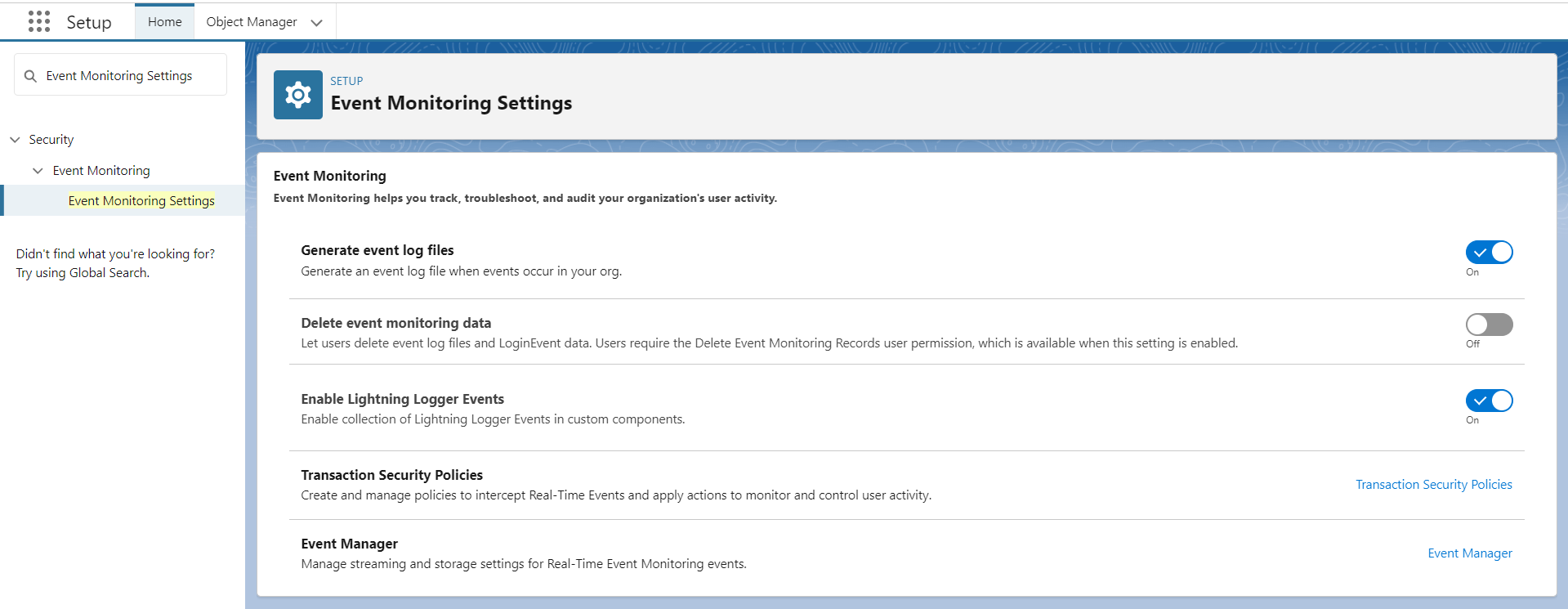
To enable Lightning Logger events, from Setup, in the Quick Find box, enter event, and then select Event Monitoring Settings. Turn on the option - Enable Lightning Logger Events.
The lightning/logger module return below fields:
| Field | Details |
|---|---|
| EVENT_TYPE | This is string type. Show the event type. Its value always LightningLogger. |
| TIMESTAMP | This is string type. The access time of Salesforce services in GMT. |
| REQUEST_ID | This is string type. Show the unique ID of a single transaction. A transaction can contain one or more events. Each event in a given transaction has the same REQUEST_ID. Ex: TID:104194039000091a94 |
| ORGANIZATION_ID | This is string type. Show the 15 character ID of the org. |
| USER_ID | This is string type. Show the 15-character ID of the user accessing Salesforce services through the UI or API.. |
| DEVICE_SESSION_ID | This is string type. Show the unique identifier of the use sesson based on page load time. When page is reload new session is started. |
| UI_EVENT_TIMESTAMP | This is Number type. Show event's timestamp (in milliseconds).. |
| UI_EVENT_RELATIVE_TIMESTAMP | This is Number type. How long (in milliseconds) it took between a message being logged and the tab opening.. |
| UI_ROOT_ACTIVITY_ID | This is string type. Which is use to show name of the application the use accessed. |
| USER_TYPE | This is string type. What kind of Salesforce access the user has (standard, community, etc.) based on their license. Customer Portal User, External Who, Self-Service, Guest, Package License Manager, Salesforce to Salesforce, CSN Only, Power Custom, Custom, Partner, Customer Portal Manager, Standard, Salesforce Administrator |
| CLIENT_ID | This is string type. Show the API client ID. |
| SESSION_KEY | This is string type. A session ID is a unique code that tracks your activity in Lightning Experience until you log out. A new ID is created each time you log in again. |
| LOGIN_KEY | This is string type. Show the It starts with a login event and ends with either a logout event or the user session expiring. |
| CLIENT_GEO | This is string type. Show the GEO location of the client. Country | State |
| CONNECTION_TYPE | This is string type. Show the connection type. Ex: 4g |
| APP_NAME | This is string type. Which is use to show name of the application the use accessed. |
| SDK_APP_VERSION | This is string type.SHow the mobile SDK version number. |
| DEVICE_PLATFORM | This is string type. The type of application experience in name:experience:form format. |
| DEVICE_MODEL | This is string type. Show the device model name. Ex: iPad, iPhone. |
| SDK_VERSION | This is string type. Which is use to show name of the application the use accessed. |
| BROWSER_NAME | This is string type. Show the name of browser that the user accessed. |
| BROWSER_VERSION | This is string type. Show the browser version in major.minor format. Some browser do not provide a mino version. |
| OS_NAME | This is string type. Show the name of operating system. Ex:windows. |
| OS_VERSION | This is string type. Show the operating system version. |
| PAGE_URL | This is string type. Show the relative url of the top-level lightning experience or salesforce mobile app page that user opened. The page contain one or more Lightning components. Multiple record IDs can be associated with PAGE_URL. Ex: /lightning/page/home. |
| PAGE_ENTITY_TYPE | This is string type. Show he entity type of the page being displayed. |
| PAGE_CONTEXT | This is string type. Show the name of the component hosting the main page content.. |
| PAGE_ENTITY_ID | This is Id type. The entity ID (if any) of the record being displayed.. |
| SDK_APP_TYPE | This is string type. Show the mobile SDK application type. Possible values are: HYBRID, HYBRIDLOCAL, HYBRIDREMOTE, NATIVE, REACTNATIVE. |
| MESSAGE | This is string type. The message passed to the lightning/logger log() method. The message can be JSON object or a string. String length is limited to 4KB (4096) character. |
| TIMESTAMP_DERIVED | This is DateTime type.The access time of Salesforce services in ISO8601-compatible format (YYYY-MM-DDTHH:MM:SS.sssZ). |
| USER_ID_DERIVED | This is Id type. Show the 18-character case-insensitive ID of the user who’s using Salesforce services through the UI or the API. |
| CLIENT_IP | This is string type. Show the IP address of the client that using Salesforce services. Ex: 49.32.432.23. |
                        public with sharing class LoggerController {

                            @AuraEnabled(cacheable=true)
                            public static List<Account> getAccountForLogger(){
                                try{
                                    List<Account> acc = [SELECT Id, Name, Type, Amount__c, BillingCountry FROM Account];
                                    return acc;
                                }
                                catch(Exception e){
                                    throw new AuraHandledException(e.getMessage());
                                }
                            }
                        }
                    <template>
                        <lightning-card>
                            <div class="slds-p-around_medium">
                                <lightning-button label="Approve" onclick={handleLog}></lightning-button>
                            </div>
                        </lightning-card>
                    </template>
                        import { LightningElement } from 'lwc';
                        import getAccountForLogger from '@salesforce/apex/PaginationController.getAccountForLogger';
                        import { log } from 'lightning/logger';


                        export default class LightningLogger extends LightningElement {


                          handleLog() {
                            getAccountForLogger()
                            .then((res)=>{
                              log(res);
                            })
                            .catch((error)=>{
                              log(error)
                            })
                          }
                        }
                        <?xml version="1.0" encoding="UTF-8"?>
                        <LightningComponentBundle xmlns="http://soap.sforce.com/2006/04/metadata">
                            <apiVersion>59.0</apiVersion>
                            <isExposed>true</isExposed>
                            <targets>
                              <target>lightning__HomePage</target>
                              <target>lightning__RecordPage</target>
                              <target>lightningCommunity__Page</target>
                            </targets>
                        </LightningComponentBundle>
LWC screen:

See log on console:

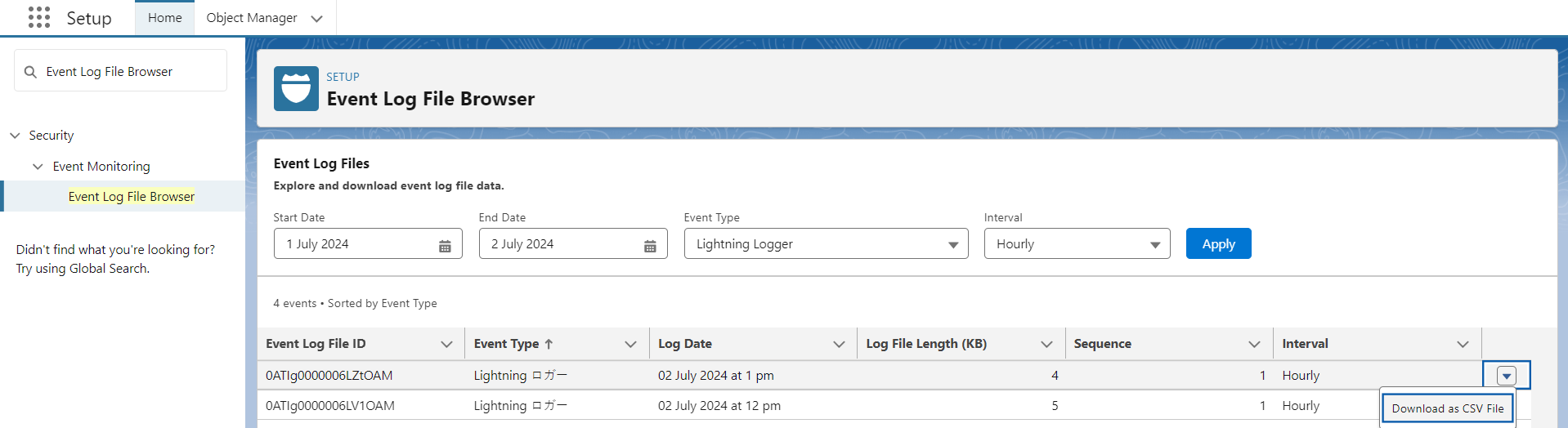
See the event log file:
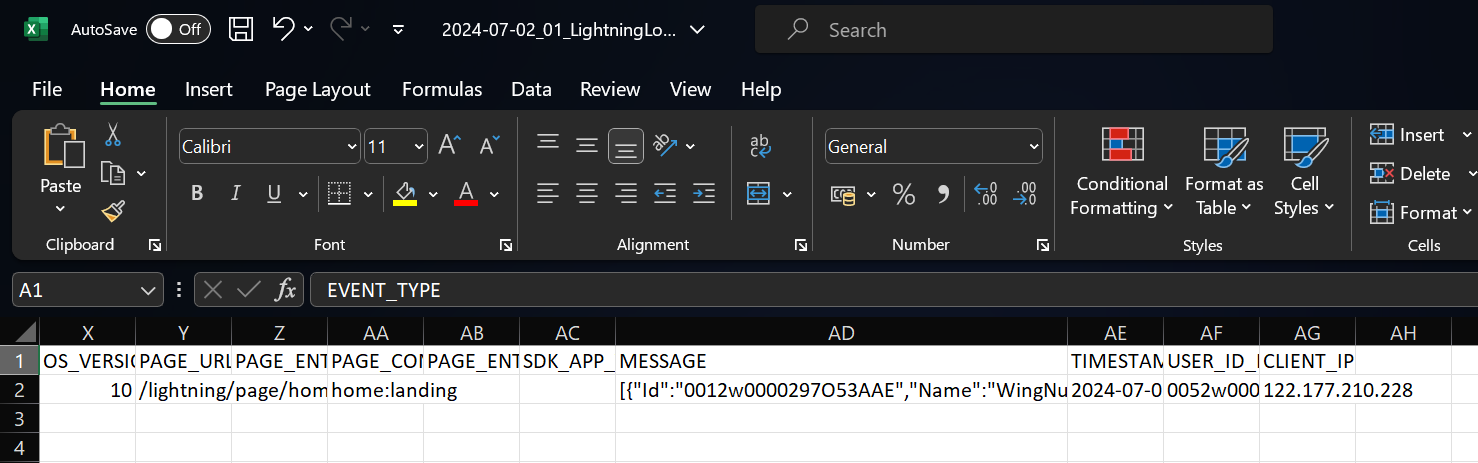
See the Log file in MS Excel file: