How to use uiRecordApi to Create, Update, Delete the record in lwc
What is lightning uiRecordApi
This module includes wire adapters to record data and get default values to create records. It also includes JavaScript APIs to create, delete, update, and refresh records.
The wire adapter are :
- getRecord
- getRecordCreateDefaults
- getRecordUi (Deprecated)
The javascript method are :
- createRecord(recordInput)
- createRecordInputFilteredByEditedFields(recordInput, originalRecord)
- deleteRecord(recordId)
- generateRecordInputForCreate(record, objectInfo)
- generateRecordInputForUpdate(record, objectInfo)
- getFieldValue(record, field)
- getFieldDisplayValue(record, field)
In this blog we will be practice only three method - createRecord(), updateRecord() and deleteRecord().
createRecord(recordInput) :
To use createRecord() method we have to import this method from lightning library
                import { createRecord } from 'lightning/uiRecordApi';

                createRecord(recordInput: Record): Promise<Record>
In this createRecord function recordInput is required property. This method return Promise object that resolves with the created record. The record contains data for the fields in the record layout.
Create record example:
                import { LightningElement} from 'lwc';
                import { createRecord  } from 'lightning/uiRecordApi';
                import BOOK_OBJECT from '@salesforce/schema/Book__c';
                import NAME_FIELD from '@salesforce/schema/Book__c.Name';
                import PRICE_FIELD from '@salesforce/schema/Book__c.Price__c'

                export default class UiRecordApiComp extends LightningElement {

                    bookId;
                    name = 'Test';
                    price = 12.0;


                    createBookRecord() {
                        const fields = {};
                        fields[NAME_FIELD.fieldApiName] = this.name;
                        fields[PRICE_FIELD.fieldApiName] = this.price;


                        const recordInput = { apiName: BOOK_OBJECT.objectApiName, fields };


                        createRecord(recordInput)
                        .then(book => {
                            console.log('createbook:'+ JSON.stringify(book));
                            this.bookId = book.id;
                            console.log('Record created with id:', this.bookId);
                        })
                        .catch(error => {
                            console.log('Error', error.body.message);
                        });
                    }
                }
updateRecord(recordInput, clientOptions):
To Updates a record this method provide the record Id of the record to update in recordInput.
Note: updateRecord uses this User Interface Api Resource, but doesn’t support all its parameters.
import { updateRecord } from 'lightning/uiRecordApi';
recordInput: This is required object used to update the record. create the RecordInput object by passing in the fields and their values. See the Usage section. The following are recordInput properties:
- triggerOtherEmail
- triggerUserEmail
- useDefaultRule
- allowSaveOnDuplicate
- apiName
- fields
- triggerOtherEmail: This is optional field for Case object. specifies whether to send email to users outside the organization. In Salesforce, this email can be triggered by creating, editing, or deleting a contact for a case. The default value is
false. - triggerUserEmail: This is optional field for Case and Lead object. specifies whether to send email to users in the organization. In the Salesforce user interface, this email can be triggered by various events: resetting a password, creating a user, changing the case owner, or adding comments to a case. The default value is
false. For case owner changes, also setuseDefaultRule=true, or no email is sent. - useDefaultRule: For a Case and Lead object, specifies whether to use the default (active) assignment rule. If you specify
useDefaultRule, don’t specify an assignmentRuleId. The default value isfalse. For an Account, specifies whether to apply the default territory assignment rules. - allowSaveOnDuplicate: Specifies whether to save a duplicate record. The default value is
false. - apiName: To create a record, specify the API name of an object from which to create the record. To update a record, use
nullor don’t pass this property. - fields: Map of field names to field values.
clientOptions— (Optional) To check for conflicts before you update a record, pass const clientOptions = {'ifUnmodifiedSince' : lastModifiedDate}. Get lastModifiedDate via a wire service adapter that returns a record object: const lastModifiedDate = record.fields.LastModifiedDate.value;.
This is return a promise object that resolves with the updated record. The record contains data for the fields in the record layout.
Update record example:
                    import { LightningElement, wire } from 'lwc';
                    import { updateRecord  } from 'lightning/uiRecordApi';

                    export default class UiRecordApiComp extends LightningElement {

                        draftValues = []; //edit data store

                        async handleSave(event) {


                            try {
                                // Convert datatable draft values into record objects
                                const records = event.detail.draftValues.slice().map((draftValue) => {
                                    const fields = Object.assign({}, draftValue);
                                    return { fields };
                                });

                                // Clear all datatable draft values
                                this.draftValues = [];

                                // Update all records in parallel thanks to the UI API
                                const recordUpdatePromises = records.map((record) => updateRecord(record));

                                let promise = await Promise.all(recordUpdatePromises);
                                if(promise) {
                                    console.log('success');
                                }
                            } catch(error) {
                                console.log('Error')
                            }
                        }
                    }
Here is another example if you want to update record using input field only. The above updateRecord example for lightning datatable.
                    handleSave(event) {

                            const allValid = [...this.template.querySelectorAll("lightning-input")].reduce((validSoFar, inputFields)=>{
                                inputFields.reportValidity();
                                return validSoFar && inputFields.checkValidity();
                            }, true)


                            if(allValid){
                                const fields = {};
                                fields[ID_FIELD.fieldApiName] = this.bookId;
                                fields[NAME_FIELD.fieldApiName] = this.template.querySelector("[data-field='Name']").value;
                                fields[PRICE_FIELD.fieldApiName] = this.template.querySelector("[data-field='Price__c']").value;


                                const recordInput = { fields };


                                updateRecord(recordInput)
                                .then(() => {
                                    refreshApex(this.wiredBookResult);
                                    this.showToast('Success', 'Book updated', 'success');
                                    this.resetInput();
                                })
                                .catch((error) => {
                                    this.showToast('Error creating record', error.body.message, 'error');
                                });
                            } else {
                                // The form is not valid
                                this.showToast('Something went wrong', 'Check your input and try again.', 'error');
                            }
                    }
deleteRecord(recordId):
To delete record passing only record input id. To delete multiple records, use Promise.all() or Apex.
This example displays a list of contact records with a delete button next to each contact record. When a record is deleted successfully, the component displays a toast message and uses refreshApex() to refresh the data provisioned via the Apex @wire.
                    async deleteBookRecord(deleteId) {
                            const recordId = deleteId;
                            console.log('delete: '+ recordId);
                            try {
                                await deleteRecord(recordId);
                                refreshApex(this.wiredBookResult);
                                this.showToast('Success', 'Book deleted', 'success');
                            } catch (error) {
                                this.showToast('Error deleting record', error.body.message, 'error');
                            }
                        }
Note: Don't call deleteRecord from a record page for a record that you want to delete. The record is deleted and you receive a 404 error with a message "The requested resource does not exist".
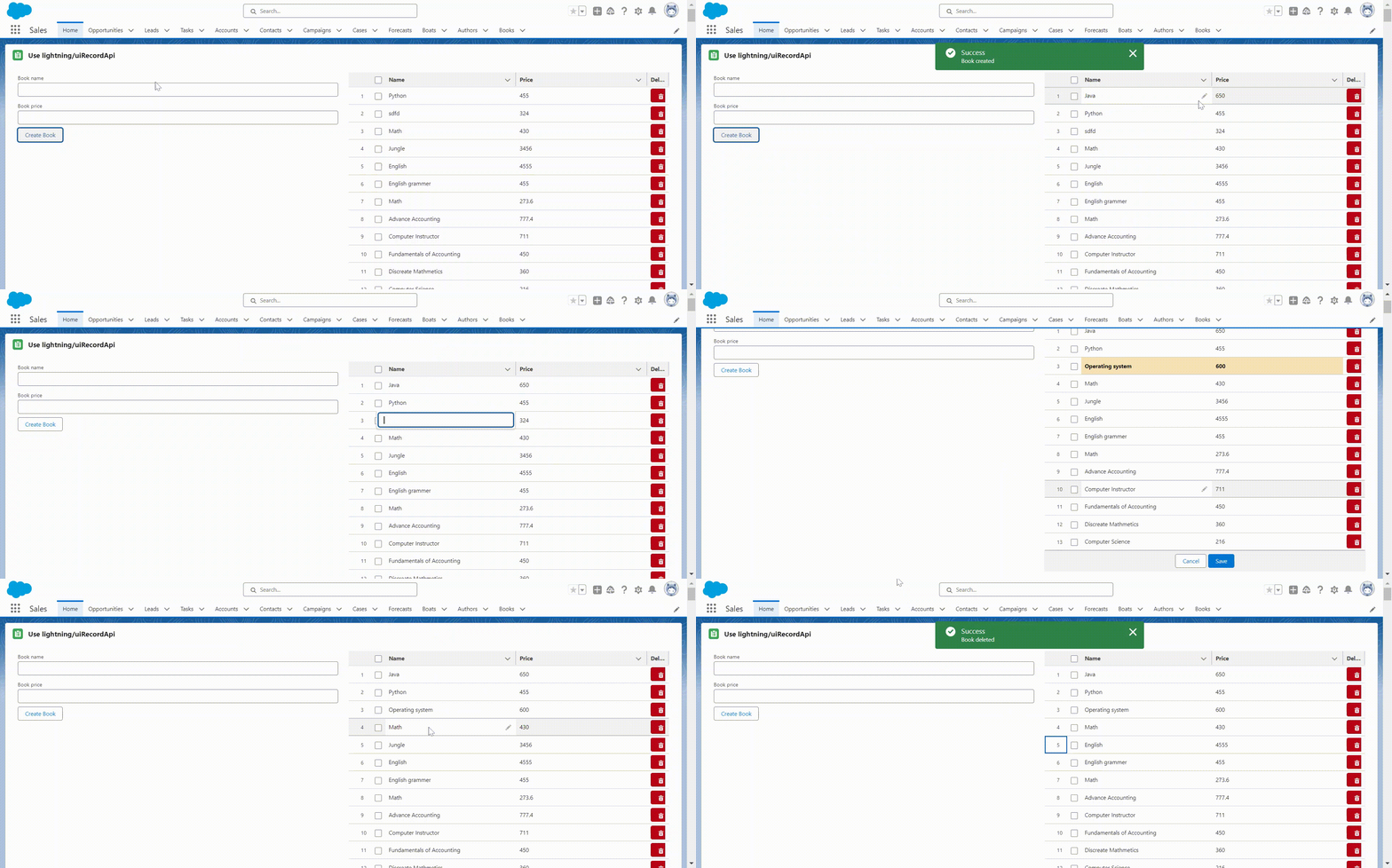
Here is full example with code:
                    <template>
                        <lightning-card title="Use lightning/uiRecordApi" icon-name="standard:record">
                           <div class="slds-m-around_medium">


                            <lightning-layout>
                                <lightning-layout-item padding="around-small" size="6">
                                    <lightning-input label="Book name" onchange={handleNameChange} value={name} data-field="Name" class="slds-m-bottom_x-small"></lightning-input>
                                    <lightning-input label="Book price" onchange={handlePriceChange} value={price} data-field="Price__c" class="slds-m-bottom_x-small"></lightning-input>

                                    <lightning-button label="Create Book" onclick={createBookRecord}></lightning-button>
                                </lightning-layout-item>


                                <lightning-layout-item padding="around-small" size="6">
                                    <lightning-datatable key-field="Id" data={books} columns={columns} onsave={handleSave} draft-values={draftValues} oncellchange={onChangeTable} onrowaction={handleRowAction}></lightning-datatable>
                                </lightning-layout-item>
                            </lightning-layout>
                           </div>
                        </lightning-card>
                    </template>
                    import { LightningElement, wire } from 'lwc';
                    import { refreshApex } from '@salesforce/apex';
                    import { createRecord, updateRecord, deleteRecord  } from 'lightning/uiRecordApi';
                    import { ShowToastEvent } from 'lightning/platformShowToastEvent';
                    import getBookList from '@salesforce/apex/DatatableController.getBookList';
                    import BOOK_OBJECT from '@salesforce/schema/Book__c';
                    import NAME_FIELD from '@salesforce/schema/Book__c.Name';
                    import PRICE_FIELD from '@salesforce/schema/Book__c.Price__c'


                    const COLUMNS = [
                        { label: 'Name', fieldName: 'Name' , editable: true},
                        { label: 'Price', fieldName: 'Price__c' , editable: true},
                        { type: "button", label: 'Delete', initialWidth: 25, typeAttributes: { name: 'Delete', title: 'Delete', disabled: false, iconPosition: 'left', iconName:'utility:delete', variant:'destructive'}},
                    ];


                    export default class UiRecordApiComp extends LightningElement {
                        bookId;
                        name = '';
                        price = 0;
                        books;
                        error;
                        draftValues = []; //edit data store


                        columns = COLUMNS;


                        wiredBookResult;
                        @wire(getBookList)
                        wiredBooks(value) {
                            this.wiredBookResult = value;
                            const {data, error} = value;
                            if (data) {
                                this.books = data;
                                this.error = undefined;
                            } else if (error) {
                                this.error = error;
                                console.log('error: '+ JSON.stringify(this.error));
                                this.books = undefined;
                            }
                        }


                        handleNameChange(event) {
                            this.name = event.target.value;
                        }


                        handlePriceChange(event) {
                            this.price = event.target.value;
                        }


                        createBookRecord() {
                            const fields = {};
                            fields[NAME_FIELD.fieldApiName] = this.name;
                            fields[PRICE_FIELD.fieldApiName] = this.price;


                            const recordInput = { apiName: BOOK_OBJECT.objectApiName, fields };


                            createRecord(recordInput)
                            .then(book => {
                                console.log('createbook:'+ JSON.stringify(book));
                                this.bookId = book.id;
                                refreshApex(this.wiredBookResult);
                                this.showToast('Success', 'Book created', 'success');
                                this.resetInput();
                            })
                            .catch(error => {
                                this.showToast('Error', error.body.message, error);
                            });
                        }


                        handleRowAction(event) {
                            const recId = event.detail.row.Id;
                            const actionName = event.detail.action.name;
                            console.log(recId, actionName);
                            if (actionName === 'Delete') {
                                this.deleteBookRecord(recId);
                            }
                        }


                        onChangeTable(event) {
                            console.log(event);
                        }

                        async handleSave(event) {


                            try {
                                // Convert datatable draft values into record objects
                                const records = event.detail.draftValues.slice().map((draftValue) => {
                                    const fields = Object.assign({}, draftValue);
                                    return { fields };
                                });

                                // Clear all datatable draft values
                                this.draftValues = [];
                                // Update all records in parallel thanks to the UI API
                                console.log('updated records: '+ JSON.stringify(records));
                                const recordUpdatePromises = records.map((record) => updateRecord(record));
                                let promise = await Promise.all(recordUpdatePromises);
                                if(promise) {
                                    this.showToast('Success', 'Book updated', 'success');
                                    refreshApex(this.wiredBookResult);
                                }
                            } catch(error) {
                                console.log('')
                            }
                        }


                        async deleteBookRecord(deleteId) {
                            const recordId = deleteId;
                            console.log('delete: '+ recordId);
                            try {
                                await deleteRecord(recordId);
                                this.showToast('Success', 'Book deleted', 'success');
                                refreshApex(this.wiredBookResult);
                            } catch (error) {
                                this.showToast('Error deleting record', error.body.message, 'error');
                            }
                        }


                        showToast(title, msg, error) {
                            const toastEvent = new ShowToastEvent({
                                title: title,
                                message: msg,
                                variant: error,
                                mode: 'dismissible'
                            })
                            this.dispatchEvent(toastEvent);
                        }


                        resetInput() {
                            this.name = '';
                            this.price;
                        }
                    }
                <?xml version="1.0" encoding="UTF-8"?>
                <LightningComponentBundle xmlns="http://soap.sforce.com/2006/04/metadata">
                    <apiVersion>59.0</apiVersion>
                    <isExposed>true</isExposed>
                    <targets>
                        <target>lightning__HomePage</target>
                    </targets>
                </LightningComponentBundle>