Lightning Message Service - Real-Time Communication between Components | LWC, Aura, Visualforce Demo
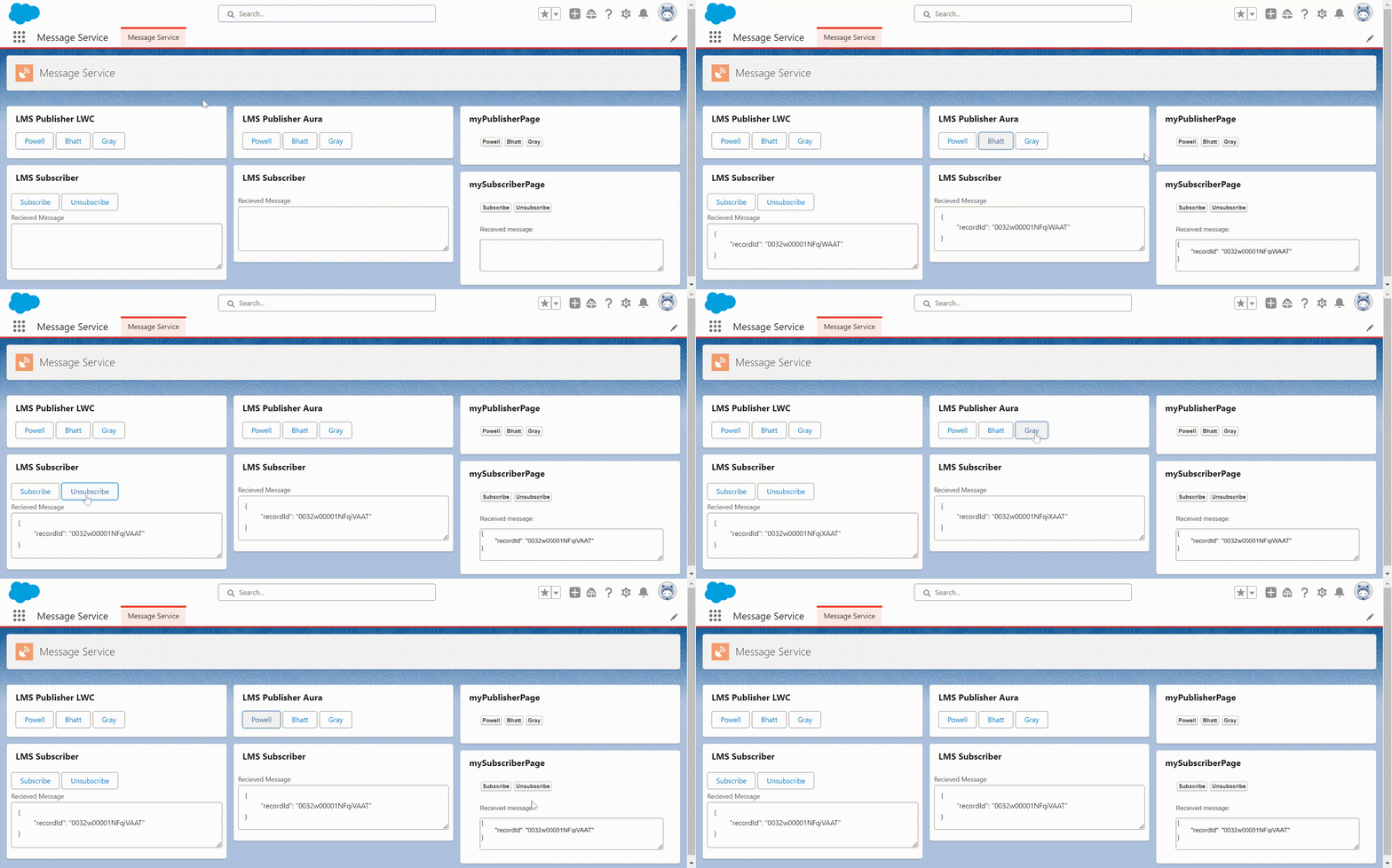
What is Lightning Message Service?
Lightning Message Service (LMS) is a way to communicate between unrelated Lightning Web Components as well as with Aura component and Visulaforce and including a pop-out utility bar. This service is also available on experience builder site for lightning web components. There are scenarios in which we want send data like Id and name to another components. which does help us find records based on Id. For that let's we do understand with examples in LWC, Aura and Visualforce.
Why do we need it?
When you communicate across the DOM(Document Object Model) and unrelated components to transfer data within a lightning page. Communicate between the Visualforce page, Aura components and Lightning Web components which are embedded in the same lightning web page. LMS is powerful and easy to use, but don't use until when it’s not necessary.
To create a lightning message channel use the lightning message channel metadata type.
Basic term in Lightning Message Channel:-
messageContext = This is an object that provides information about LWC that is using LMS.
messageChannel = This is a pre-defined channel that is established connection using the LMS metadata type. It acts as communications between components.
message = This is an object. which a serializable JSON object containing the message published to subscribers. This can't contain functions or symbols.
publisher = This contains message data that is sent to the designated channel.
subscriber = This is a listener for messages on specific channels and takes action upon receiving the message.
listener = This is a function that handles a message once it is published.
subscriberOptions = This is an object. which is optional, when set to {scope: APPLICATION_SCOPE} specify the ability to receive a message on messageChannel from anywhere in application
Note: LightningMessageChannel components are available in API version 47.0 and later.
How to define message channel Metadata in org:-
- Go to the force-app\main\default folder.
- Create a new folder messageChannels.
- Inside messageChannels folder create a new file messageService.messageChannel-meta.xml. [The file format must be as
messageChannelName.messageChannel-meta.xml]
                        <?xml version="1.0" encoding="UTF-8"?>
                        <LightningMessageChannel xmlns="http://soap.sforce.com/2006/04/metadata">
                            <masterLabel>SampleMessageChannel</masterLabel>
                            <isExposed>true</isExposed>
                            <description>This is a sample Lightning Message Channel.</description>
                        </LightningMessageChannel>
                        <?xml version="1.0" encoding="UTF-8"?>
                        <LightningMessageChannel xmlns="http://soap.sforce.com/2006/04/metadata">
                            <masterLabel>SampleMessageChannel</masterLabel>
                            <isExposed>true</isExposed>
                            <description>This is a sample Lightning Message Channel.</description>


                            <lightningMessageFields>
                                <fieldName>recordId</fieldName>
                                <description>This is the record Id that changed</description>
                            </lightningMessageFields>

                        </LightningMessageChannel>
Note: The default value of isExposed is false. When you set true in isExposed on message channel that is in a managed package or reference by another message channel. We can not change true it to false. Because other components and orgs rely on this message channel which can cause their code to break.
Now we defined a message channel which we will use in the Lightning web component with an example:-
First, we will create a publisher component. In this component, we get contact list from the apex class and then show in LWC. When clicking on the contact name the moment the contact Id is published.
DatatableController.apxc
                        public without sharing class DatatableController {
                            public DatatableController() {


                            }


                            @AuraEnabled(cacheable=true)
                            public static List<Contact> getContacts() {
                                return [
                                    SELECT Id, LastName
                                    FROM Contact WHERE Account.Name != null
                                    WITH SECURITY_ENFORCED LIMIT 3
                                ];
                            }
                        }
Use Lightning Message Service in Lightning Web Component
                        <template>
                            <lightning-card title="LMS Publisher LWC">
                                <div class="slds-m-around_medium">
                                    <template lwc:if={contacts.data}>
                                        <template for:each={contacts.data} for:item="contact">
                                            <lightning-button class="slds-m-right_xx-small"  key={contact.Id} data-contact-id={contact.Id} onclick={publicMessageService} label={contact.LastName}></lightning-button>
                                        </template>
                                    </template>
                                </div>
                            </lightning-card>
                        </template>
                        import { LightningElement, wire } from 'lwc';
                        import getContactList from '@salesforce/apex/DatatableController.getContacts';


                        // Import message service features required for publishing and the message channel
                        import { publish, MessageContext } from 'lightning/messageService';
                        import messageChannel from '@salesforce/messageChannel/messageService__c'


                        export default class MyPublisherComponent extends LightningElement {
                            @wire(getContactList)
                            contacts;


                            @wire(MessageContext)
                            messageContext;


                            // Respond to UI event by publishing message
                            publicMessageService(event) {
                                const payload = { recordId: event.target.dataset.contactId };
                                console.log('LWC payload: '+ JSON.stringify(payload));
                                publish(this.messageContext, messageChannel, payload);
                            }
                        }
                        <?xml version="1.0" encoding="UTF-8"?>
                        <LightningComponentBundle xmlns="http://soap.sforce.com/2006/04/metadata">
                            <apiVersion>59.0</apiVersion>
                            <isExposed>true</isExposed>


                            <targets>
                                <target>lightning__AppPage</target>
                                <target>lightning__RecordPage</target>
                                <target>lightningCommunity__Page</target>
                            </targets>
                        </LightningComponentBundle>
When you click on contact name it execute publicMessageService event which contains the payload object with record id. This object hold the message sent to messageService__c message channel. Here is recordId with value. These value are stored in key - value format. Then the javascript controller find the message channel and call the publish() with the payload
Now create subscriber component to receive message from the publisher component.
                        <template>
                        <lightning-card title="LMS Subscriber">
                            <lightning-layout class="slds-p-around_x-small">
                                <lightning-layout-item size="12">
                                    <lightning-button class="slds-m-right_xx-small" label="Subscribe" onclick={subscribeMessageChannel}></lightning-button>
                                    <lightning-button class="slds-m-right_xx-small" label="Unsubscribe" onclick={unSubscribeMessageChannel}></lightning-button>
                                    <lightning-textarea label="Recieved Message" readonly="true" value={receivedMessage} ></lightning-textarea>
                                </lightning-layout-item>
                            </lightning-layout>
                        </lightning-card>
                        </template>
                        import { LightningElement, track, wire } from 'lwc';
                        import { APPLICATION_SCOPE, MessageContext, subscribe, unsubscribe } from 'lightning/messageService';
                        import messageChannel from '@salesforce/messageChannel/messageService__c'
                        import getContactList from '@salesforce/apex/DatatableController.getContacts';


                        export default class MySubscriberComponent extends LightningElement {


                            subscription = null;
                            @track receivedMessage;


                            @wire(getContactList, { recordId: '$recordId' })
                            wiredRecord({ error, data }) {
                                if (error) {
                                    console.log('error: ' + JSON.stringify(error));
                                } else if (data) {
                                    this.receivedMessage = data
                                    console.log('recievedMessage: '+ JSON.stringify(data));
                                }
                            }


                            @wire(MessageContext)
                            messageContext;


                            connectedCallback() {
                                this.subscribeMessageChannel();
                            }


                            subscribeMessageChannel() {
                                if(this.subscription) {
                                    return;
                                }
                                this.subscription = subscribe(this.messageContext, messageChannel, (message)=>{
                                    this.receivedMessage = message ? JSON.stringify(message, null, '\t') : 'no message payload';
                                },{ scope: APPLICATION_SCOPE })
                            }


                            unSubscribeMessageChannel() {
                                unsubscribe(this.subscription);
                                this.subscription = null;
                            }


                        }
The subscribeMessageChannel() method check first subscirption is null or not. If subscription is null, it call the subscribe method of LMS. and assign it to subscription. This take three requied parameters - message context, message channel and callback method for get message. Fourth is optional parameter { scope: APPLICATION_SCOPE }.
We can define scope only when using @wire(MessageContext) for lightning web components.
                        <?xml version="1.0" encoding="UTF-8"?>
                        <LightningComponentBundle xmlns="http://soap.sforce.com/2006/04/metadata">
                            <apiVersion>59.0</apiVersion>
                            <isExposed>true</isExposed>


                            <targets>
                                <target>lightning__AppPage</target>
                                <target>lightning__RecordPage</target>
                                <target>lightningCommunity__Page</target>
                            </targets>
                        </LightningComponentBundle>
Use Lightning Message Service in Aura Component
To use the message service channel in Aura we create a publisher page and a subscriber page. To access the message service on Aura page use the lightning:messageChannel and use the public() method in controller js file. In the lightning:messageChannel component has the required type attribute in which set the message channel name.
Note: If the message channel does not come from your local org and It came from the package then the syntax would be:
<lightning:messageChannel type="Namespace__MessageChannelName__c"/>.
                        <aura:component implements="force:appHostable,flexipage:availableForAllPageTypes" access="global" controller="DatatableController">

                            <!-- Including lightning:messageChannel makes it available to publish to from this component -->
                            <lightning:messageChannel type="messageService__c" aura:id="messageChannel"/>

                            <aura:attribute name="contactList" type="Contact[]"/>
                            <aura:handler name="init" value="{!this}" action="{!c.doInit}" />

                            <lightning:cardtitle="LMS Publisher Aura">
                                <div class="slds-m-around_medium" >
                                    <aura:if isTrue="{!v.contactList}">
                                        <aura:iteration items="{!v.contactList}" var="con">
                                            <button class="slds-button slds-button_neutral" data-contact-id="{!con.Id}" onclick="{!c.publicMessageService}">{!con.LastName}</button>
                                        </aura:iteration>
                                    </aura:if>
                                </div>
                                </lightning:card>
                        </aura:component>
                        ({
                            doInit:function(component, event, helper) {
                                var action = component.get('c.getContacts');
                                action.setCallback(this, function(response) {
                                    var state = response.getState();
                                    if (state === 'SUCCESS') {
                                        console.log('success');
                                        component.set('v.contactList', response.getReturnValue());
                                    }
                                    else if (state === "INCOMPLETE") {
                                        // do something
                                    }
                                    else if (state === "ERROR") {
                                        var errors = response.getError();
                                        if (errors) {
                                            if (errors[0] && errors[0].message) {
                                                console.log("Error message: " + errors[0].message);
                                            }
                                        } else {
                                            console.log("Unknown error");
                                        }
                                    }
                                });
                                $A.enqueueAction(action);

                            },

                            publicMessageService: function (component, event) {
                                var payload = { recordId:  event.target.dataset.contactId };
                                // Publish LMS message with payload
                                console.log('Aura payload: '+ JSON.stringify(payload));
                                component.find('messageChannel').publish(payload);
                            }
                        })
                        <aura:component implements="force:appHostable,flexipage:availableForAllPageTypes" access="global" >
                            <lightning:messageChannel type="messageService__c" onMessage="{!c.handleChanged}" scope="APPLICATION" aura:id="messageChannel"/>
                            <aura:attribute name="recordValue" type="String"/>


                            <lightning:card title="LMS Subscriber">
                                <lightning:layout class="slds-p-around_x-small">
                                    <lightning:layoutItem size="12">
                                            <lightning:textarea name="textarea" readonly="true" value="{!v.recordValue}" row="4" label="Recieved Message" />
                                        </lightning:layoutItem>
                                </lightning:layout>
                            </lightning:card>
                        </aura:component>
                        ({
                            handleChanged: function(cmp, event, helper) {
                                // Read the message argument to get the values in the message payload
                                 if (event != null && event.getParam("recordId") != null) {
                                    let params = event.getParams();
                                    cmp.set("v.recordValue", JSON.stringify(params, null, "\t"));
                                }
                            },
                        })
Aura components that use lightning:messageChannel can’t call Lightning Message Service methods in the init lifecycle handler because the component hasn’t rendered.
In aura component subscribe() and unsubscribe() does not support as it is in LWC component. The <lightning:messageChannel> tag automatically handle subscribe and unsubscribe when component is render.
Use Lightning Message Service in Visualforce page
To use the message service channel in Visualforce we create a publisher page and a subscriber page. To access the message service on Visualforce page use the global variable $MessageChannel and write a method that calls sforce.one.publish(). A message is a serializable JSON object in which we can pass numbers, strings, boolean, and objects. This message is available only in Lightning Experience.
In javascript section, we get referenec from custom Lightning Message Channel. This create token which is unique to your message channel. The publish() method take two parameters message channel and message payload.
                        <apex:page controller="DatatableController">
                            <apex:repeat value="{!contacts}" var="con">
                                <button value="{!con.Id}" onclick="publicMessageService(this)">{!con.LastName}</button>
                            </apex:repeat>

                            <script>
                                // Load the Message Channel token in a variable
                                var contextMessage = "{!$MessageChannel.messageService__c}";

                                function publicMessageService(event) {
                                    var recordId = event.value;
                                    const payload = { recordId: recordId }
                                    console.log('VF payload: '+ JSON.stringify(payload));
                                    sforce.one.publish(contextMessage, payload);
                                }
                            </script>

                        </apex:page>
To subscribe and unsubscribe message channel in visualforce use the sforce.one.subscribe() and sforce.one.unsubscribe() methods.
                        <apex:page >
                             <div>
                                <button onclick="subscribeMessageChannel()">Subscribe</button>
                                <button onclick="unSubscribeMessageChannel()">Unsubscribe</button>
                                <br/>
                                <br/>
                                <p>Received message:</p>
                                <textarea id="messageTextArea" rows="4" style="disabled:true;width:100%;"/>
                            </div>

                            <script>
                                // Load the Message Channel token in a variable
                                var contextMessage = "{!$MessageChannel.messageService__c}";
                                var subscription = null;

                                window.onload = function(){
                                    subscribeMessageChannel();
                                };


                                function handleMessage(message) {
                                    var textArea = document.querySelector('#messageTextArea');
                                    textArea.innerHTML = message ? JSON.stringify(message, null, '\t') : 'no message payload';
                                }


                                function subscribeMessageChannel() {
                                    if (subscription) {
                                        return;
                                    }
                                    subscription = sforce.one.subscribe(contextMessage, handleMessage);
                                }


                                function unSubscribeMessageChannel() {
                                    if (subscription) {
                                        sforce.one.unsubscribe(subscription);
                                        subscription = null;
                                    }
                                }
                            </script>
                        </apex:page>
Note: If the message channel does not come from your local org and It came from the package then the syntax would be:
{$MessageChannel.NameOfPackageNamespace__MessageChannelFileName__c}This service supports only the following:
- Lightning Experience standard navigation.
- Lightning Experience console navigation.
- Salesforce mobile app for Aura and Lightning Web Components. But not for the visualforce pages.
Limitations of Lightning Message Service:
- LMS does not work when pages are loaded in chatter publisher <chatter:feed showPublisher="true"/>.
- Use the Native Lightning Publisher instead.
- LMS does not work in iframe including <wave:ifrmae>, <apex: iframe>, and Html <ifrmae>.
- LMS does not work in Salesforce Classic and when previewing Visualforce from setup.
- Visualforce supports only those LMS in which isExposed is true.
- This does not work with the Salesforce Tab and Visualforce sites or with Visualforce pages in Experience Builder sites.